The best wedding planning apps in 2026 do one of three things well: they hold your guest list, they hold your money, or they hold your inspiration. Almost nothing does all three, and the couples who plan most calmly are the ones who stopped looking for the app that does. Below are the 12 we’d actually put on a phone, what each one is for, and what it costs.
Here’s a GWS tip before you download anything: make one folder on your home screen, name it something you’ll enjoy seeing, and put every wedding app inside it. Planning creep is real. A folder contains it.
The 12 best wedding planning apps at a glance
| App | Best for | Free version | Where it lives |
|---|---|---|---|
| Zola | All-in-one planning and registry | Yes, fully free | iOS, Android, web |
| Lovebird | Coordinated stationery and guest comms | Free website; paid from $49 | Web |
| WedSites | Planning tools and guest management | Free Lite plan; paid from $39 | Web |
| Joy | Guest list and RSVP tracking | Yes, fully free | iOS, Android, web |
| PicturesQR | Collecting guest photos | No, $39 one-time | Web, no app needed |
| Minted | Invitations and paper goods | Free to browse | Web |
| Monarch | Wedding budget tracking | 7-day trial, then paid | iOS, Android, web |
| Inspiration and organizing ideas | Yes, fully free | iOS, Android, web | |
| Canva | DIY signage and stationery | Yes, generous free tier | iOS, Android, web |
| Spotify | Playlists for every event | Free tier with ads | iOS, Android, web |
| Etsy | Handmade and personalized details | Free to browse | iOS, Android, web |
| Postable | Thank you notes | Free to browse | Web |
The free wedding planning apps worth downloading first
If you want to spend nothing, you can still cover most of the planning. Zola, Joy, Pinterest, Canva, and Spotify are all genuinely free, not free-trial free, and Lovebird’s wedding website is free with a custom URL before you add anything to it. That combination gets you a wedding website, a guest list with RSVP tracking, an inspiration library, custom signage, and every playlist you need.
What you’ll pay for, eventually: budgeting that actually syncs to your bank (Monarch), guest photo collection (PicturesQR), and anything printed. Those are the three places the free tier runs out, and they’re worth knowing in advance so the cost doesn’t surprise you in month four.
1. Best All-rounder: Zola

Zola gets that wedding planning is a journey, and the app is built around the small days as much as the big one. The day your first RSVP comes in. The day someone buys the thing off your registry you were embarrassed to add.
Everything lives in one place: the vendor directory, the registry with zero-fee cash funds, invitations, and a full checklist you can tick off while standing in line at the grocery store, which is more satisfying than it has any right to be. The budgeting tool tracks what the wedding is actually costing against what you said it would cost, which are famously two different numbers.
The best part is still Gift Shuffle, a registry builder that works like a dating app. Le Creuset, swipe right. And if you want a real person, Zola’s wedding experts do free one-on-one coffee chats. Actual experts, not just your very vocal MIL.
Cost: Free. Platforms: iOS, Android, web.
2. Best for guest communication with a point of view: Lovebird

If everything else on this list solves a logistics problem, Lovebird solves an aesthetic one. The premise is that your guests see your invitation and your website before they see your flowers, your dress, or your venue, and that those first touchpoints should look like they came from the same wedding as everything that follows.
The suites coordinate across the whole arc: engagement announcement, save the date, website, invitation, thank you card. Pick a design once and every message your guests receive carries it. That sounds like a small thing until you have sent your fourth update and none of them match.
Underneath the design, it is a real guest communication platform. RSVPs, meal selections, dietary restrictions, guest polling for song requests, and targeted messaging, so you can send parking details to confirmed guests and a weather update to everyone. Delivery goes by text or email, which is the quiet reason digital RSVPs actually get answered. Password protection keeps the whole thing off the open web.
The website itself is free with a custom URL, and the paid tiers add the stationery and the RSVP tools. Worth doing the math before you flinch at the top tier: paper invitations for 150 guests run several hundred dollars before postage.
Cost: Free wedding website; paid packages start at $49 one-time, with the full stationery and guest management suite at the top tier. Platforms: Web.
3. Best for planning depth: WedSites
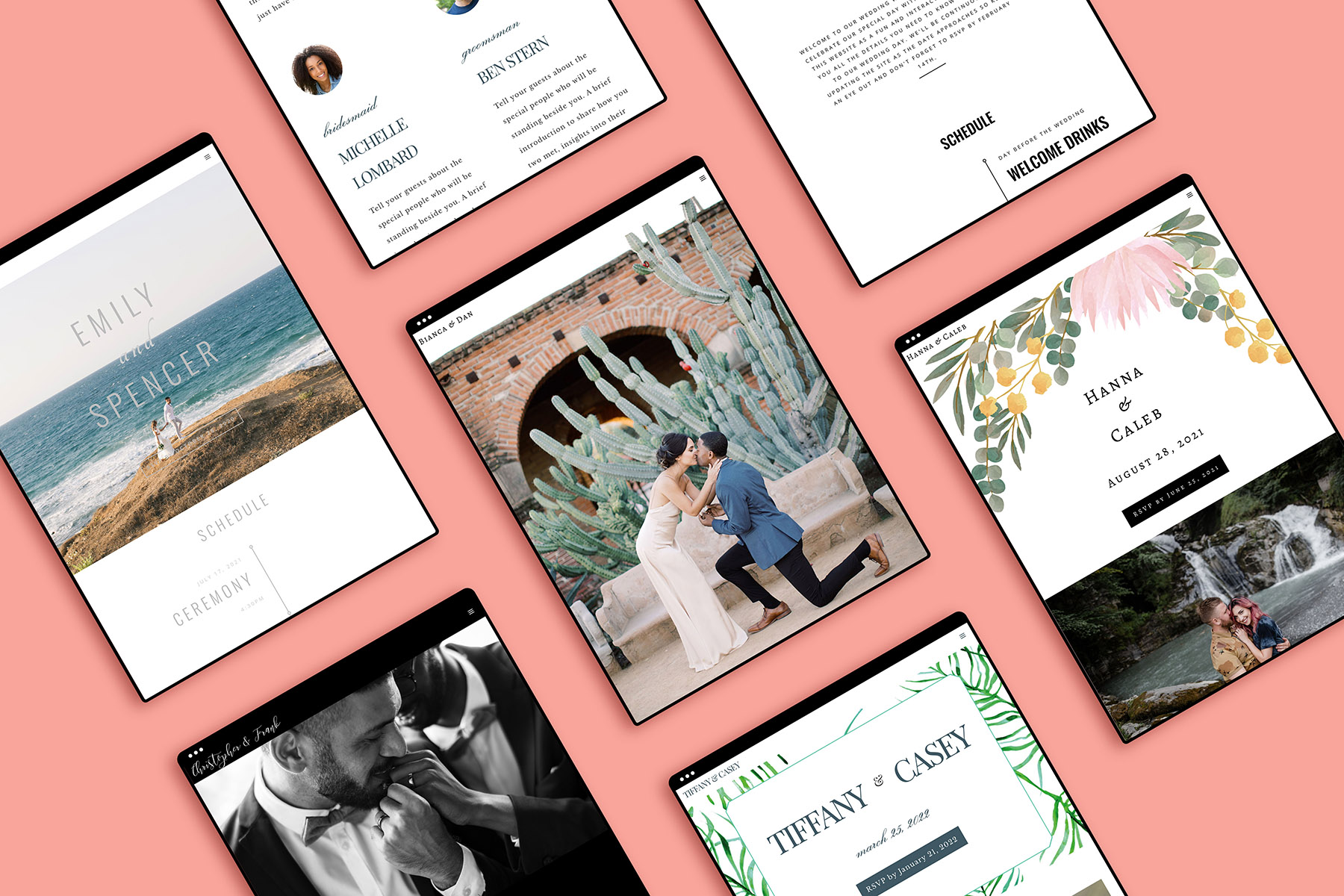
Gone are the days of hacking together spreadsheets and lugging around a notebook. WedSites is an all-in-one platform for your website and everything you send from it, and unlike most wedding website templates, there’s nothing cookie-cutter here. Change layouts, fonts, colors, upload your own graphics.
Where it goes deeper than most website platforms is the planning layer underneath: a budget tracker, vendor management with payment tracking, a seating planner, and a timeline builder, all sitting behind the same login as your guest list. If you have been running your wedding out of four spreadsheets and a notes app, this is the one that consolidates them.
Multi-language support is built in, which matters more than most platforms acknowledge for multicultural weddings. Invite your partner and your wedding party to collaborate so the whole thing doesn’t live in one person’s inbox.
One thing to know before you buy: the planning tools are the top tier, not the entry one. If you want the budget and timeline builders, that is the plan you need.
Cost: Free Lite plan for the website; paid plans start at $39 one-time, $99 for guest communication, $199 for the full planning suite. Platforms: Web.
4. Best for guest list and RSVPs: Joy

Joy does one thing better than the all-in-ones: it makes your guest list feel manageable. Households group together, plus-ones behave logically, meal choices and dietary notes attach to the person instead of living in a separate tab, and the RSVP flow is clean enough that your relatives will actually complete it.
If you’re using Zola for registry and someone else for the website, Joy is still worth having as the guest list source of truth.
Cost: Free. Platforms: iOS, Android, web.
5. Best for collecting guest photos: PicturesQR

Your photographer is extraordinary and your photographer cannot be in two rooms at once. This is the gap PicturesQR fills, and it’s the addition to this list we’re most enthusiastic about.
You create an event page, you get a QR code, and your guests scan it and upload straight from their camera roll. No app to download, no account to make, which is the entire reason it works. Anything that asks a 70-year-old to create a login at a wedding is a feature nobody uses. Uploads are unlimited, guests and hosts have 12 months to add and download, and everything lands in a private gallery you can lock behind a PIN. There are print-ready sign templates included, so you’re not designing anything at 11pm.
What you get back is the wedding from the inside. The table that could not stop laughing during the toast. Your dad watching you dance with someone else. The moments your photographer was in another room for, taken by people who love you.
Cost: $39 one-time. Platforms: Web, no app required for you or your guests.
6. Best for Invitations: Minted

Minted works with independent artists to design their save-the-dates and invitation suites, which is why the paper here doesn’t look like anyone else’s paper. Every design customizes to your colors, and the range extends past invitations into signage, day-of decor, favors, and thank you cards, so the whole paper story stays coherent.
Order samples before you commit. Screens lie about paper.
Cost: Free to browse, priced per order. Platforms: Web.
7. Best for tracking your wedding budget: Monarch
Monarch links your bank and card accounts and lets you build custom categories, so you can run “florals” and “attire” and “honeymoon” as real line items and watch each one against the total instead of finding out in month six that the flowers quietly ate the photography budget. It was built by the product manager behind Mint, which is why it feels immediately familiar to anyone who used to budget that way.
The feature that earns its place here is the shared household view. You and your partner see the same numbers, which quietly solves the most common wedding money problem: two people spending toward one budget without seeing each other’s spending.
It’s a paid subscription after the trial. For a year of tracking a five-figure event, that’s a defensible line item.
Cost: Free trial, then paid subscription. Platforms: iOS, Android, web.
8. Best for inspiration: Pinterest

Listing Pinterest is not a groundbreaking call, and it stays because nothing has replaced it. The real use isn’t scrolling, it’s capture. When a dress catches your eye at a boutique before you’re ready to open your wallet, photograph it, upload it to a private board with the designer’s name, and you’ll still have it in four months when you can’t remember anything.
Make one wedding board, break it into sections, keep the ones you’d rather not explain to your mother-in-law private. Add the browser plug-in so you can save from anywhere on the web.
Cost: Free. Platforms: iOS, Android, web..
9. Best for DIY signage and stationery: Canva

Canva has quietly become the most-used wedding app that isn’t a wedding app. Welcome signs, seating charts, menus, bar signs, programs, table numbers. The template library is enormous and the free tier covers nearly all of it.
The reason it belongs here rather than in a general-tools list: printing your own signage is one of the few DIY moves that saves real money without looking like a DIY move, as long as you pay for decent paper and a proper print shop. Design free, print well.
Cost: Free tier is generous; Pro adds custom fonts and brand assets. Platforms: iOS, Android, web.
10. Best for playlists: Spotify
Build a playlist for every event, not just the reception: the engagement party, the shower, the bachelorette, the getting-ready morning, the drive to the venue. Share the reception one with your DJ as a reference for taste rather than a strict running order, and share the getting-ready one with your people so the morning has a soundtrack somebody chose on purpose.
We have curated lists for songs to walk down the aisle to, first dance songs, mother-son dance, father-daughter dance, and cake cutting.
Cost: Free with ads; Premium removes them. Platforms: iOS, Android, web.
11. Best for unique details: Etsy

Etsy is where the details that make a wedding specifically yours come from. We’ve found shoes, dresses, robes, ceremony decor, invitations, table numbers, and cake toppers there, and the personalized work (embroidered handkerchiefs, custom vow books, hand-painted signage) is genuinely hard to source anywhere else.
Order early. Handmade means one person is making it, and one person cannot make it faster because your date moved up. Start with our GWS Etsy favorites.
Cost: Free to browse, priced per order. Platforms: iOS, Android, web.
12. Best for thank you notes: Postable

You’re in the glow of the honeymoon phase and the last thing you want is to handwrite 140 notes. Postable stores every address you collected, lets you personalize cards online, and handles the printing, addressing, and mailing.
The address collection is the part to set up early. Send the link with your save-the-dates and let people fill in their own addresses, because chasing 140 mailing addresses after the wedding is its own small tragedy.
Cost: Free to browse, priced per card. Platforms: Web.
Frequently asked questions
Zola, for the widest coverage at no cost: checklist, budget, guest list, website, vendor directory, and registry in one place with no paid tier required. Joy is the better free pick if your guest list is complicated and RSVP tracking is the part you actually need to get right.
Most couples end up with three or four. A planning home base (Zola or WedSites), something for how it all looks (Lovebird), something for money (Monarch), something for inspiration (Pinterest), and something for guest photos (PicturesQR). The trap is downloading twelve and maintaining none.
Yes. Zola, Joy, Pinterest, Canva, Spotify, and Etsy all have full Android apps with feature parity to iOS. WedSites, Minted, PicturesQR, and Postable are web-based, which means they work identically on any phone.
Look for collaboration as a named feature rather than assuming it. Zola, WedSites, Lovebird, and Joy all support multiple logins on one wedding, and Monarch has a shared household view for budgets. Collaboration is the feature most couples wish they’d checked for before committing.
Set up your guest list and budget tools first, ideally within a month of getting engaged, because both get exponentially harder to reconstruct later. The website and invitation tools can wait until you have a date and venue confirmed. Photo collection can be set up the month before.
One Last Thing
None of these apps tell you what to do first, though, and that’s the part most couples actually get stuck on. If you’re at the very beginning and the whole thing feels shapeless, start with our how to plan a wedding guide, then come back and download the two or three apps that fit the plan you’ve made.
Twelve apps, and you will not need all twelve. Pick the three that solve your actual problems, put them in one folder, and let the rest go. The wedding is not the planning.
